While Loops as an Alternative
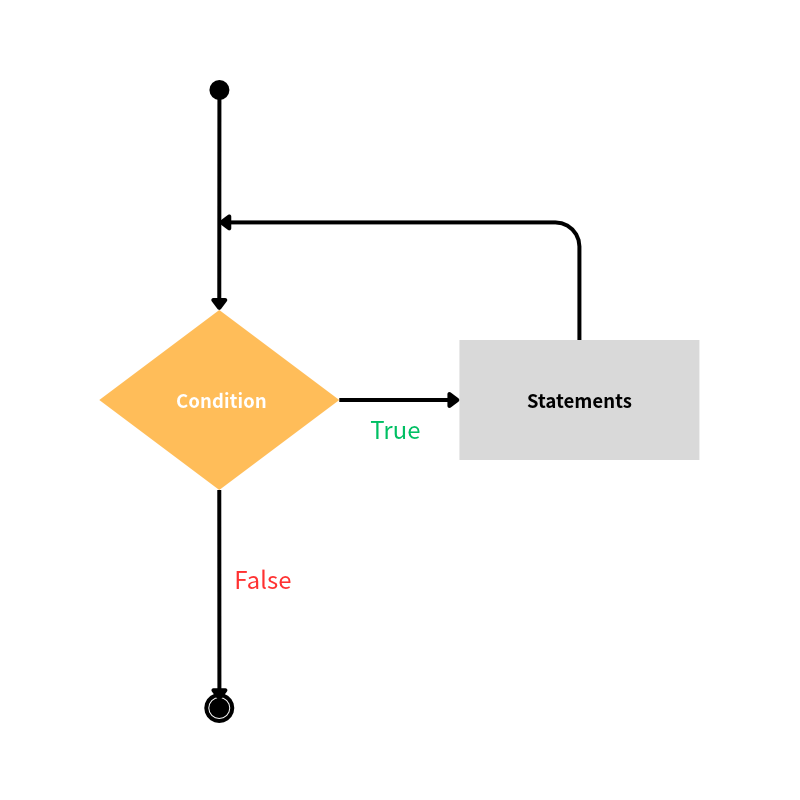
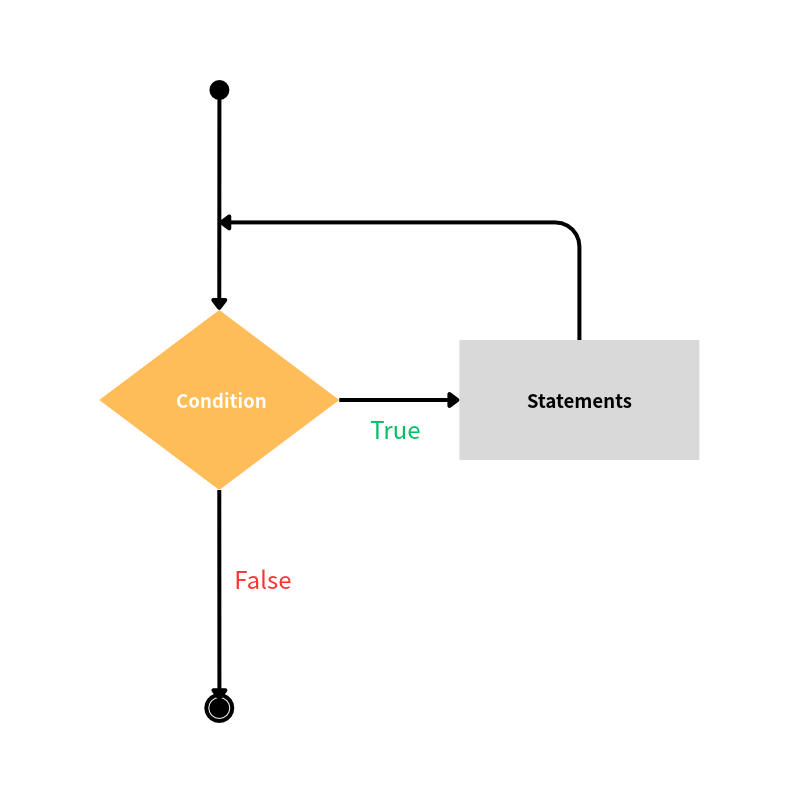
The main alternative to for loops is while loops. They will be repeatedly executed as long as the given condition is satisfied, or more concretely, the corresponding boolean expression is True. The syntax for a while loop is while <boolean_expression>:, followed by an indented code block that is to be repeated. For example,
s = 0ii = 0while s <= 200: ii += 1 s += ii print(f"Adding {ii} to the sum, the current value is {s}.")print("The sum is greater than 200 now.")
This code initializes the sum s and an integer ii with the value 0. At each run of the while loop, ii increases by 1 and is then added to s, so that we are effectively computing the sum of the first ii integers. It goes on until s is bigger than 200 and the boolean expression becomes False, then it terminates and prints the final statement:
Adding 1 to the sum, the current value is 1.Adding 2 to the sum, the current value is 3.Adding 3 to the sum, the current value is 6.Adding 4 to the sum, the current value is 10.Adding 5 to the sum, the current value is 15....Adding 16 to the sum, the current value is 136.Adding 17 to the sum, the current value is 153.Adding 18 to the sum, the current value is 171.Adding 19 to the sum, the current value is 190.Adding 20 to the sum, the current value is 210.The sum is greater than 200 now.
Another classic example is to repeatedly ask for the user’s input until it matches the desired value, as a guessing game:
ans = 5while int(input("Guess an integer:")) != 5: print("Wrong guess!")print("Bingo!")
At the beginning of each while loop iteration, the boolean expression triggers the associated input function and prompts the user’s input. After receiving the guess, the boolean comparison checks whether it is equal to the answer. If not, then it shows the wrong message, goes back all the way to the start of the while loop, and asks again. If it matches, then the boolean comparison is False and exits the while loop, showing the bingo message. A test run gives
Guess an integer:3Wrong guess!Guess an integer:7Wrong guess!Guess an integer:5Bingo!
A longer, but perhaps more readable way to do so is
ans = 5guess = int(input("Guess an integer:"))while guess != ans: print("Wrong guess!") guess = int(input("Guess an integer:"))print("Bingo!")
This has the advantage of incorporating if statements for more control and flexibility, e.g.
ans = 5guess = int(input("Guess an integer:"))while guess != ans: if guess > ans: print("Too big!") elif guess < ans: print("Too small!") guess = int(input("Guess an integer:"))print("Bingo!")
which may give
Guess an integer:3Too small!Guess an integer:7Too big!Guess an integer:5Bingo!
Combining Flags with While Loops
In the last tutorial, we talked about the use of a flag to signal the termination of a for loop. In fact, flags are somehow more suitable to work with while loops due to their boolean-checking nature. Let’s take a look at a minimal example about processing students’ grades:
scores = [99, 50, 75, -33, 60]invalid_flag = Falsewhile (len(scores) > 0) and (invalid_flag != True): score = scores.pop(0) if (score < 0) or (score > 100): invalid_flag = True print("Warning! An invalid score.") else: print("Processing the score:", score) pass # do something about grade conversionif invalid_flag == False: print("Exit without problem.")
The while loop processes the list of scores one by one while utilizing the pop method as long as the list has at least one entry left. If it encounters an invalid score, then it sets the invalid_flag to True so it may record the occurrence of an error. And when the next iteration starts, it will check the flag and if there has been an error, it will quit. Finally, the status of invalid_flag at the end can also indicate if the task has been completed successfully.
Now try running the above code while changing the scores list to play with it. This kind of flagging mechanism is very helpful when the code or system becomes massive: flags can provide important information on where/how the code has failed and assist in debugging. (Of course, this may be done without involving while loops.)
Some Recommendations
Both for loops and while loops are iterative statements that can repeatedly execute certain code blocks, and under suitable circumstances we can use either of them to achieve our tasks. So the question is when to prefer one over another. It is recommended to write for loops most of the time if possible. This is because a for loop always has a predetermined stopping point defined at the beginning, and so we will have a good estimate of how long it will take to complete. In contrast, we often do not know beforehand when while loops, even just slightly complicated, will end (and in what ways). The worst case is that there may be a bug in the boolean logic for controlling the while loop so that it becomes an infinite loop and never stops. To demonstrate, we may accidentally overlook and write something like
i = 0s = 0while s%3 != 2: i += 1 s += i
Think about why it will turn into an infinite loop. And if you run these lines and want to terminate the program (which should get stuck and show nothing), you can press Ctrl+C in the terminal or Ctrl+D in interactive Python. However, sometimes this “disadvantage” is actually desirable, as some difficult problems may not have an obvious stopping point that can be inferred beforehand and we can only know when it should exit during the computation stage. (see the exercise below!)
Exercise
Modify the exercise in this tutorial to write a function that calculates the number of factors (excluding \(1\) and itself) of an integer, and find the smallest number that has at least \(8\) non-trivial/proper factors.
Suggested Solution
def num_factors(n): m = 0 for ii in range(2, n//2+1): if n % ii == 0: m += 1 return(m)n = 1while num_factors(n) < 8: n += 1print(f"The number {n} has {num_factors(n)} non-trivial factors!")
The num_factors function calculates the number of factors of an integer n by naively trying all the possible factors (think about why we write n//2+1?), raises the count m by 1 whenever a factor is found, and eventually returns the value of m. In the main while loop, we repeatedly check if n (starting at 1) has less than 8 factors using num_factors, if so, then we increment n by 1, until n indeed has at least 8 factors.



Leave a Reply